Imagine a student named Ali who needs a device for school. He wants to read books, watch lessons, and write homework. His friend uses a tablet, while his teacher works on a laptop. A tablet is a small, flat device with a touch screen. You can use your fingers to open apps, read books, and watch videos. A laptop is a portable computer with a screen, keyboard, and touchpad. It is often better for long tasks, such as writing and coding. The difference between tablet and laptop can help Ali choose the right device. The difference between tablet and laptop also matters to workers, teachers, and families. By learning the difference between tablet and laptop, people can save money and choose a device that fits their needs.
Key Difference Between Tablet and Laptop
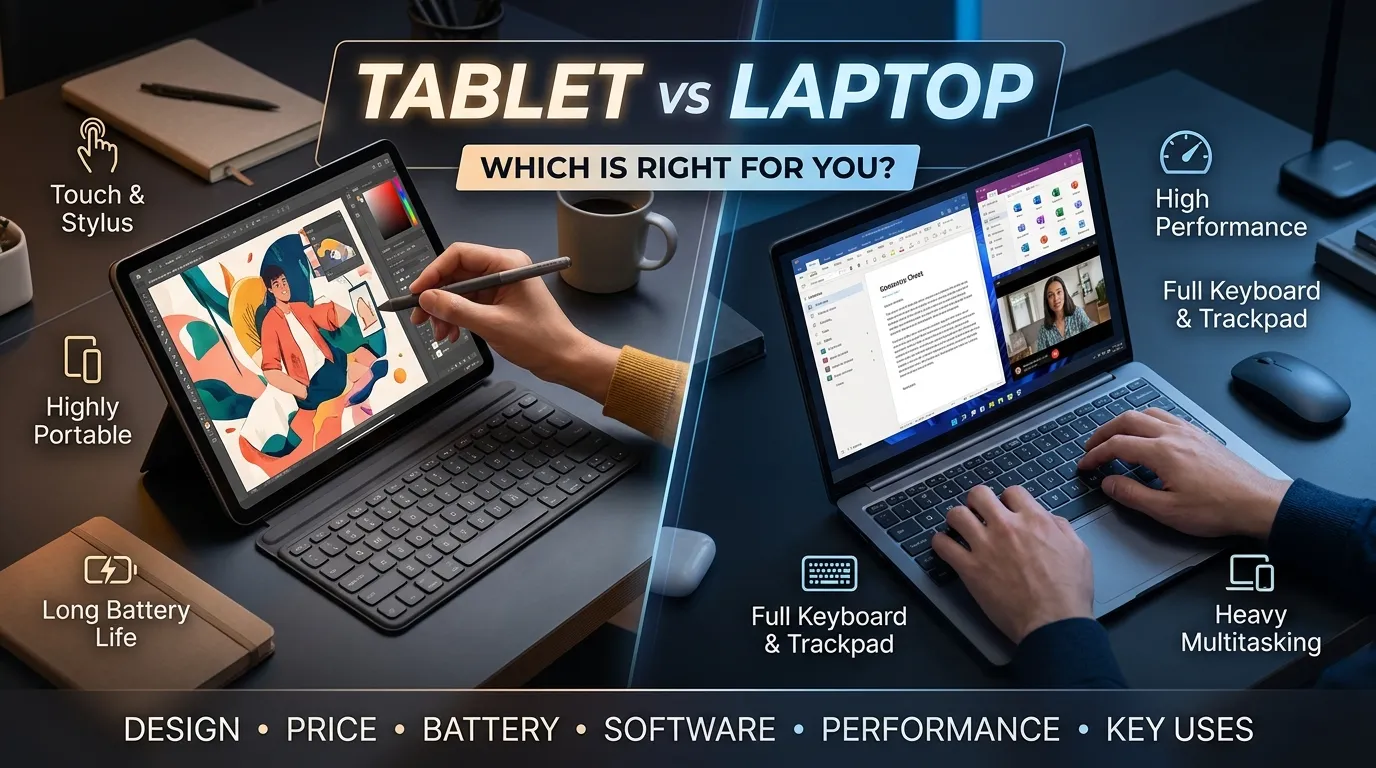
The main difference is how you use each device. A tablet mainly uses a touch screen. A laptop usually has a built-in keyboard and touchpad. Tablets are often lighter and easier to carry. Laptops are often better for long work, typing, and complex tasks.
Why Is It Important to Know Their Difference?
Students need this knowledge to choose the right device for learning. Teachers use these tools to share lessons and help students. Workers may need a laptop for reports, meetings, and office tasks. A tablet may be better for reading, drawing, and quick notes. Knowing the difference helps people spend money wisely. It also helps schools and offices choose devices that fit their work.
Pronunciation of Tablet and Laptop
Tablet
- US English: /ˈtæblət/
- UK English: /ˈtæblət/
Laptop
- US English: /ˈlæpˌtɑːp/
- UK English: /ˈlæpˌtɒp/
A Quick Look Before We Begin
Tablets and laptops both help people learn, work, and enjoy media. Yet they have different designs and strengths. One may suit a student who reads a lot. The other may suit a worker who writes long reports. Let us explore ten key differences.
Difference Between Tablet and Laptop
1. Design and Shape
Tablet: A tablet is a flat device with a touch screen. Most tablets have no built-in keyboard.
Laptop: A laptop has a screen and a keyboard joined by a hinge. It often folds shut for easy travel.
Examples:
- A student holds a tablet while reading an e-book.
- A worker opens a laptop to type a report.
2. Input Method
Tablet: You can use your fingers or a digital pen to control a tablet. Some models also support a separate keyboard.
Laptop: You usually type with a physical keyboard and move the pointer with a touchpad or mouse.
Examples:
- An artist draws on a tablet with a digital pen.
- A writer types a long story on a laptop keyboard.
3. Portability
Tablet: Tablets are often light and easy to carry in a small bag. Many can be held in one hand.
Laptop: Laptops are also portable, but many are larger and heavier than tablets.
Examples:
- A traveler reads on a small tablet during a trip.
- A student carries a laptop to a class to take notes.
4. Performance
Tablet: Many tablets work well for web browsing, video calls, reading, and simple games. Some high-end tablets can also handle demanding tasks.
Laptop: Many laptops are built for longer or more complex tasks. Some support powerful tools for coding, design, and video editing.
Examples:
- A child uses a tablet to watch a learning video.
- A video editor uses a powerful laptop to edit a film.
5. Battery Life
Tablet: Many tablets can last a full day of light use, but battery life depends on the model and task.
Laptop: Laptop battery life varies widely. Some last many hours, while powerful models may need charging sooner.
Examples:
- A reader uses a tablet on a long trip without charging it often.
- A worker checks the battery life of a laptop before a long meeting.
6. Software and Apps
Tablet: Tablets often use mobile systems such as iPadOS or Android. They run apps made for touch screens.
Laptop: Laptops often use Windows, macOS, or Linux. They can run many full desktop programs.
Examples:
- A student uses a tablet app to practice a new language.
- A programmer uses desktop tools on a laptop to write code.
7. Typing and Productivity
Tablet: A tablet works well for short notes and messages. A separate keyboard can make typing easier.
Laptop: A laptop has a built-in keyboard, which is useful for long writing tasks.
Examples:
- A student types a quick reminder on a tablet.
- An office worker writes a long report on a laptop.
8. Storage and File Use
Tablet: Many tablets have set storage space. Some support memory cards or cloud storage, but this depends on the model.
Laptop: Many laptops offer more ways to store and manage files. Some allow users to upgrade the storage drive.
Examples:
- A reader saves a few e-books on a tablet.
- A photographer stores large image files on a laptop with a large drive.
9. Price
Tablet: Many basic tablets cost less than many laptops. But high-end tablets and their add-ons can cost a lot.
Laptop: Laptop prices vary by size, brand, and power. Basic models can be affordable, while gaming and work models may cost much more.
Examples:
- A family buys a basic tablet for reading and video calls.
- A design student saves money for a laptop that can run design software.
10. Best Uses
Tablet: A tablet is often best for reading, watching videos, drawing, and using touch-based apps.
Laptop: A laptop is often best for writing, office work, coding, and tasks that need desktop software.
Examples:
- A teacher uses a tablet to show pictures during a lesson.
- An accountant uses a laptop to manage large spreadsheets.
Nature and Behaviour of a Tablet
A tablet is made for simple, quick, and touch-based use. It starts fast and is easy to carry. Its screen is useful for reading, watching videos, and drawing. Many tablets also support video calls and online classes.
A tablet can be used with a digital pen or a separate keyboard. However, some work may be harder on a small screen. The way it handles files and apps also depends on its operating system. A tablet can do much more than play videos, but it may not replace a laptop for every task.
Nature and Behaviour of a Laptop
A laptop is made for many kinds of computer work. It has a built-in keyboard and usually a touchpad. Its larger screen can make it easier to work with text, tables, and several windows at once.
Laptops can run many desktop programs. Some are made for school and office work, while others are built for gaming or design. They may be heavier than tablets, but they often give users more ways to manage files and work with different tools. Their power and battery life depend on the model.
Why Do People Confuse Tablets and Laptops?
People often confuse tablets and laptops because both can connect to the internet, run apps, play videos, and help with schoolwork. Some tablets can use a keyboard and mouse, so they may look and feel like small laptops.
The main difference is not only their shape. Their software, input methods, and work tools can also differ. A tablet may handle simple office tasks well, while a laptop may offer more support for full desktop programs. Some tablets are more powerful than basic laptops, so the best choice depends on the exact model and task.
Table Showing the Differences and Similarities
| Feature | Tablet | Laptop |
| Design | Flat touch screen | Screen and built-in keyboard |
| Main input | Touch or digital pen | Keyboard and touchpad |
| Size | Often smaller | Often larger |
| Weight | Often lighter | Often heavier |
| Typing | On-screen or separate keyboard | Built-in keyboard |
| Software | Often mobile apps | Often desktop programs |
| Battery life | Often long for light use | Varies by model |
| Storage | Often fixed | May be upgradeable |
| Best for | Reading, drawing, and media | Typing, coding, and office work |
| Price | From low-cost to high-end | From low-cost to high-end |
Similarities Between Tablets and Laptops
- Both can connect to the internet.
- Both can run apps and programs.
- Both can play videos and music.
- Both can help with school and work.
- Both can store files and photos.
- Both can use video calls.
- Both come in many sizes and prices.
also read more about https://comparificationn.com/difference-between-methanol-and-ethanol-2/
Which Is Better in What Situation?
A tablet is often better for people who read, draw, watch videos, or take quick notes. It is easy to carry and simple to use. It can also work well for online classes and travel.
A laptop is often better for people who type long reports, use large spreadsheets, write code, or run desktop software. Its keyboard and larger screen can make long tasks easier. Still, the best choice depends on the model and the work you need to do. Think about your budget, apps, and daily tasks before buying either device.
How Are Tablets and Laptops Used in Metaphors and Similes?
The words tablet and laptop are not common in old idioms, but writers can use them in modern comparisons.
Tablet in a Metaphor
Example: “The tablet was her window to the world.”
This means the tablet helped her learn about people and places.
Laptop in a Metaphor
Example: “His laptop was his office on the road.”
This means he could work while traveling.
Tablet in a Simile
Example: “The tablet was as light as a book.”
This compares its light weight to a book.
Laptop in a Simile
Example: “The laptop worked like a small office.”
This means it helped the user do many work tasks.
These examples use creative language. They are not technical definitions.
Connotative Meaning of Tablet and Laptop
Tablet: Neutral or Positive
The word tablet is usually neutral. It names a type of device. It may have a positive meaning when linked to learning, art, or easy travel.
Positive example: “Her tablet helped her read books wherever she went.”
It may have a negative meaning if someone feels it causes too much screen time.
Negative example: “The child spent all day on the tablet and did not play outside.”
Laptop: Neutral or Positive
The word laptop is also neutral. It may suggest work, study, skill, and freedom.
Positive example: “His laptop helped him finish his school project on time.”
It may have a negative meaning when linked to stress or too much work.
Negative example: “She stayed up late with her laptop and felt tired the next day.”
The feeling linked to each word depends on the situation.
Idioms and Proverbs Related to Tablets and Laptops
There are no common English idioms that focus only on tablets or laptops. But some well-known sayings can help explain how to choose and use them.
- “The right tool for the job.” Choose a tool that fits the task.
Example: A student picks a tablet for reading and a laptop for writing a long report. She chooses the right tool for the job. - “A little goes a long way.” A small amount can be enough.
Example: A basic tablet may be all a child needs for reading and online lessons. A little goes a long way. - “Don’t judge a book by its cover.” Do not judge something by its looks alone.
Example: A thin tablet may look simple but can have strong features. Do not judge a book by its cover. - “Measure twice, cut once.” Check carefully before making a choice.
Example: Before buying a laptop, Ali checks its price, battery, and software. He follows the idea of measuring twice and cutting once.
Works in Literature Related to Tablets and Laptops
Tablets and laptops are modern devices, so few well-known books focus only on them. The following works explore technology, computers, or their effects on people.
- The Shallows: What the Internet Is Doing to Our Brains — Nonfiction; Nicholas Carr; 2010. It looks at how internet use may affect the way people think and read.
- Neuromancer — Science fiction; William Gibson; 1984. It explores computers, networks, and digital worlds.
- Little Brother — Young adult science fiction; Cory Doctorow; 2008. It explores technology, privacy, and young people.
- The Circle — Novel; Dave Eggers; 2013. It looks at a world shaped by digital tools and online life.
These books discuss technology and digital life. They are not all stories about tablets or laptops alone.
Movies Related to Tablets, Laptops, and Computer Technology
Few major films focus only on tablets or laptops. These films show computers, digital tools, or the effects of technology.
- WarGames — 1983; United States. A young person uses a computer and starts a serious chain of events.
- The Social Network — 2010; United States. A drama about the rise of Facebook and the people behind it.
- Jobs — 2013; United States. A biographical drama about Steve Jobs and the growth of Apple.
- The Imitation Game — 2014; United Kingdom and United States. A historical drama about Alan Turing and codebreaking machines.
- Searching — 2018; United States. A thriller that uses computer screens and digital clues to tell its story.
These films are related to computers and technology. They are not all about the difference between tablets and laptops.
Five Possible Asked Questions About Tablets and Laptops
1. What is the main difference between a tablet and a laptop?
A tablet mainly uses a touch screen. A laptop has a built-in keyboard and usually a touchpad. Laptops often suit long work tasks, while tablets are handy for reading and quick use.
2. Can a tablet replace a laptop?
Yes, for some people. A tablet can handle reading, video calls, web browsing, and simple documents. But some jobs need desktop software or a full keyboard, so a laptop may be better.
3. Which is better for students?
It depends on the student’s needs. A tablet can be good for reading and online lessons. A laptop is often better for long essays, coding, and tasks that need desktop programs.
4. Which device is easier to carry?
A tablet is often easier to carry because it is usually smaller and lighter. However, some small laptops are also light and easy to take on trips.
5. Which device has better battery life?
There is no single answer. Many tablets last a long time during light use, but some laptops also have strong battery life. Check the battery details of the exact model before buying.
How Are Tablets and Laptops Useful for Our Surroundings?
Tablets and laptops help people learn, work, and share ideas. Students can use them to read books and attend online lessons. Teachers can share notes and show videos. Doctors and other workers can use them to manage records and speak with people far away.
These devices can also reduce the need for printed pages. People can read digital books, send files, and hold online meetings. This may save paper and travel. However, making and disposing of electronic devices uses resources and can create waste. People can help by using devices for longer, repairing them when possible, and recycling them through safe programs.
Final Words on Tablets and Laptops
Tablets and laptops both make life easier, but they serve different needs. A tablet is often best for reading, drawing, and quick tasks. A laptop is often better for long typing, office work, and desktop programs.
Neither device is the best choice for everyone. Think about what you need to do each day. Check the price, battery life, screen, storage, and software before you buy. A device that fits your needs can save time and money.
Conclusion
The difference between tablet and laptop is important when choosing a device for school, work, or home. A tablet is often light and easy to use with touch controls. It works well for reading, drawing, and watching videos. A laptop has a built-in keyboard and often supports more desktop tools. This makes it useful for long reports, coding, and office tasks. Both devices can connect to the internet, run apps, and store files. The best choice depends on your needs and budget. Think about the tasks you do most often before you buy. With the right device, you can learn, work, and stay in touch with ease.

I’m Zahid Abbas, an educator, researcher, and digital publishing strategist with a passion for linguistics, grammar, and clear communication. As a content creator and SEO specialist, I craft research-driven, reader-focused content that empowers learners and makes knowledge accessible worldwide.