Imagine a company with workers in many places. They need to talk to each other, hold meetings, and share ideas. At the same time, customers call the company to ask questions or get help. The company needs tools for both jobs. This is where UCaaS and CCaaS come in.
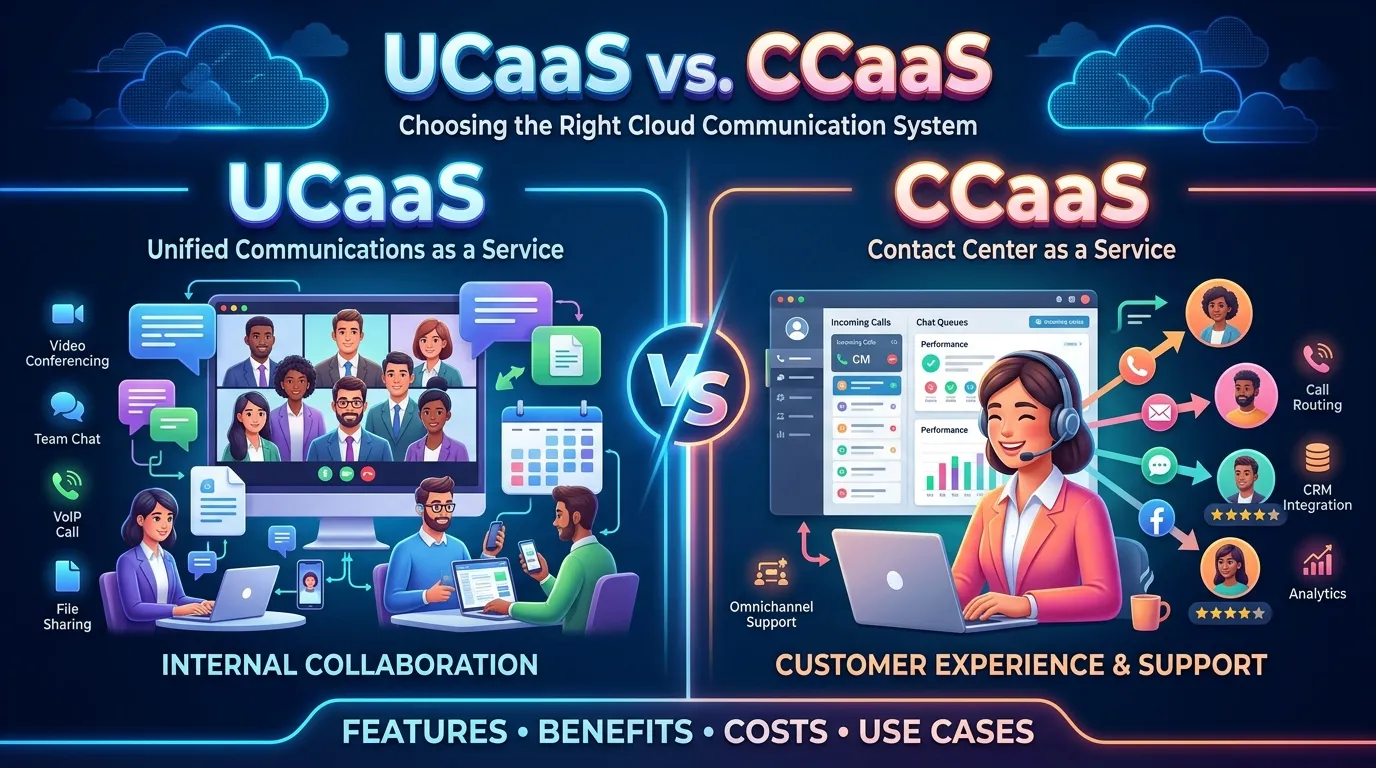
UCaaS means Unified Communications as a Service. It helps workers talk and work together through calls, video meetings, chat, and other tools. CCaaS means Contact Center as a Service. It helps a company manage customer calls, messages, and support. The difference between UCaaS and CCaaS is mainly about who uses the tools and why. Knowing the difference between UCaaS and CCaaS helps a business choose the right system. It can also help workers give better service and save time.
Key Difference Between UCaaS and CCaaS
UCaaS helps workers connect and work as a team. CCaaS helps a company talk to customers and solve their problems.
Why Is It Important to Know the Difference?
Learners, business owners, IT workers, and team leaders need to know these terms. This helps them choose tools that fit their needs. The right system can make work easier, help teams share ideas, and improve customer care.
Pronunciation of UCaaS and CCaaS
- UCaaS: Say each letter: “you-see-ay-ay-ess.”
- CCaaS: Say each letter: “see-see-ay-ay-ess.”
Difference Between UCaaS and CCaaS
1. Meaning
UCaaS
UCaaS is a cloud-based service that brings many work tools into one place. Workers can use it to call, chat, and hold online meetings.
- Example 1: A teacher uses video calls to meet with staff in other schools.
- Example 2: A sales team uses chat and calls to plan its work.
CCaaS
CCaaS is a cloud-based service made for customer support teams. It helps them handle calls, emails, chats, and other customer messages.
- Example 1: A bank uses CCaaS to answer customer questions.
- Example 2: An online shop uses it to help buyers track orders.
2. Main Purpose
UCaaS
The main goal of UCaaS is to help workers talk and work together. It makes team talks simple, even when workers are far apart.
- Example 1: Workers in two offices hold a video meeting.
- Example 2: A manager sends a team message about a new task.
CCaaS
The main goal of CCaaS is to help a company serve its customers. It helps teams answer questions and solve problems.
- Example 1: A customer calls to ask about a late order.
- Example 2: A support worker helps a user reset a password.
3. Main Users
UCaaS
UCaaS is often used by workers, managers, teachers, and other teams inside an organization.
- Example 1: A design team shares ideas in an online meeting.
- Example 2: A manager calls staff to discuss a work plan.
CCaaS
CCaaS is mainly used by customer service agents, help desks, and contact center teams.
- Example 1: An agent answers a question about a bill.
- Example 2: A support team handles customer complaints.
4. Main Features
UCaaS
UCaaS often offers business phone calls, video meetings, team chat, and file sharing. The exact tools depend on the service.
- Example 1: A team uses chat to share a work update.
- Example 2: Staff use video calls to plan a project.
CCaaS
CCaaS often offers call routing, waiting queues, call records, and tools to track customer cases. Some systems also use AI to help agents.
- Example 1: A system sends a billing call to the billing team.
- Example 2: A manager checks how many calls the team answered.
5. Type of Communication
UCaaS
UCaaS supports daily talks between people at work. It helps workers share news, ask questions, and make plans.
- Example 1: A worker sends a chat message to a team member.
- Example 2: A group joins a video call to plan a new product.
CCaaS
CCaaS supports talks between a company and its customers. It helps the company manage many requests across different channels.
- Example 1: A customer sends a message to ask about a return.
- Example 2: A call center answers a phone call about a service issue.
6. Customer Support
UCaaS
UCaaS can help workers discuss customer needs with each other. However, it may not include all the tools needed to run a busy contact center.
- Example 1: A sales worker asks a manager for help with a customer.
- Example 2: A staff member calls a product expert to check a detail.
CCaaS
CCaaS is built to manage customer support. It can help agents deal with requests and keep track of customer contact.
- Example 1: An agent sees a customer’s earlier support case.
- Example 2: A system sends a call to an agent who can help.
7. Reports and Data
UCaaS
UCaaS reports may show call use, meeting activity, or service quality. These reports can help a team see how it uses its tools.
- Example 1: A manager checks how often staff use video meetings.
- Example 2: An IT worker checks call quality.
CCaaS
CCaaS reports often focus on customer service. They may show wait times, call numbers, agent work, and customer feedback.
- Example 1: A team leader checks how long customers wait.
- Example 2: A company reviews feedback after support calls.
8. Work Process
UCaaS
UCaaS helps workers share information and complete tasks. It can make team work smoother.
- Example 1: A team uses chat to share daily tasks.
- Example 2: Workers hold a quick video meeting before a project starts.
CCaaS
CCaaS helps agents follow a clear process when they handle customer requests. It may send each request to the right team.
- Example 1: A call about a refund goes to the billing team.
- Example 2: A support case is sent to a worker with the right skills.
9. Cost and Setup
UCaaS
UCaaS is often sold as a cloud service with a monthly fee. The cost may depend on users, features, and call needs.
- Example 1: A small firm pays for phone and video tools for its staff.
- Example 2: A company adds new workers to its cloud phone plan.
CCaaS
CCaaS is also often sold as a cloud service. The cost may depend on the number of agents, contact channels, and extra tools.
- Example 1: A shop pays for a service to manage customer calls and chats.
- Example 2: A larger support team pays for more agent seats.
Costs vary by provider, plan, and use. A company should compare the full cost before it picks a service.
10. Best Use
UCaaS
UCaaS is best when a company needs better ways for its workers to talk and work together.
- Example 1: A school uses it for staff calls and online meetings.
- Example 2: A firm with remote workers uses it to stay in touch.
CCaaS
CCaaS is best when a company needs to manage many customer calls and messages.
- Example 1: An airline uses it to answer booking questions.
- Example 2: An online store uses it to handle returns and complaints.
Nature and Behaviour of UCaaS
UCaaS is a team-focused system. It brings work tools into one place, so people can connect from different locations. It supports daily talks, meetings, and team plans. And it can also help remote workers feel part of the same team.
UCaaS can grow as a company grows. A business may add users or tools as needed. Its main role is to make work communication simple and smooth.
Nature and Behaviour of CCaaS
CCaaS is a customer-focused system. It helps a business manage calls, chats, emails, and other customer requests. It can send each request to the right agent or team.
CCaaS may also track wait times, agent work, and customer feedback. These tools help managers find problems and improve service. Its main role is to help customers get clear and timely support.
Why People Confuse UCaaS and CCaaS
People often confuse UCaaS and CCaaS because both use cloud technology. Both may offer calls, chat, and links to other business tools. Some services even share features.
The main difference is their goal. UCaaS helps people inside a business work together. CCaaS helps a business manage contact with its customers. A company may use both systems, as they can work well together.
Table of Differences and Similarities
| Point | UCaaS | CCaaS |
| Full form | Unified Communications as a Service | Contact Center as a Service |
| Main goal | Team communication | Customer service |
| Main users | Workers and teams | Contact center agents |
| Common tools | Calls, chat, video meetings | Call routing, queues, customer records |
| Main focus | Work inside the company | Contact with customers |
| Reports | Call and meeting use | Customer service results |
| Delivery | Usually cloud-based | Usually cloud-based |
| Cost | Often based on users and features | Often based on agents and features |
| Similarity | Helps people communicate | Helps people communicate |
| Can work together? | Yes | Yes |
Which Is Better in What Situation?
When Is UCaaS Better?
UCaaS is better when a company wants its workers to talk and work together with ease. It is a good choice for teams that work from home or in many offices. It helps staff make calls, hold meetings, and share updates. For example, a school can use UCaaS to connect teachers, while a small firm can use it to link workers in different cities. It can also reduce the need for many separate tools. If the main goal is to improve team talks, UCaaS may be the right choice.
When Is CCaaS Better?
CCaaS is better when a company needs to handle many customer calls, chats, or emails. It can help send each request to the right agent. It may also track wait times and customer feedback. For example, a bank can use CCaaS to manage calls about accounts, while an online shop can use it to handle returns. These tools can help a team give faster and better support. If the main goal is to improve customer care, CCaaS may be the right choice.
When Should a Business Use Both?
Some companies need both systems. UCaaS helps workers share ideas and solve work issues. CCaaS helps agents serve customers. When the two systems work together, an agent may ask another team for help while still keeping the customer request in view. For example, a support agent may contact a product expert to solve a hard problem. A business should choose tools based on its size, goals, and budget.
UCaaS and CCaaS in Metaphors and Similes
UCaaS and CCaaS are tech terms, so they do not have many common idioms of their own. Still, we can use metaphors and similes to explain them in simple words.
Metaphors for UCaaS
A metaphor says that one thing is another thing to show an idea.
- “UCaaS is the glue that holds a team together.” This means it helps workers stay in touch.
- “UCaaS is a bridge between offices.” This means it links workers who are far apart.
Similes for UCaaS
A simile compares two things using words such as like or as.
- “UCaaS is like a shared meeting room online.” Workers can meet without being in the same place.
- “UCaaS works like a team hub.” It brings work talks into one place.
Metaphors for CCaaS
- “CCaaS is the front door of customer care.” It helps customers reach the company.
- “CCaaS is a traffic guide for customer calls.” It sends requests to the right team.
Similes for CCaaS
- “CCaaS is like a smart switchboard.” It helps direct calls and messages.
- “CCaaS works like a help desk that never sleeps.” A cloud system can support teams across different work hours, based on its setup.
- also read more about https://comparificationn.com/difference-between-eloping-and-marriage-3/
Connotative Meaning of UCaaS and CCaaS
A connotative meaning is the feeling or idea that a word brings to mind. UCaaS and CCaaS are technical terms. Their meanings are mostly neutral, but people may link them with good or bad results.
UCaaS: Positive, Negative, and Neutral Meanings
- Positive: It may suggest teamwork, speed, and easy contact.
Example: “Our UCaaS tools help the whole team work as one.” - Negative: It may suggest too many alerts or too much screen time if not used well.
Example: “The team feels tired because UCaaS messages never seem to stop.” - Neutral: It may simply name a type of cloud service.
Example: “The firm plans to review its UCaaS plan.”
CCaaS: Positive, Negative, and Neutral Meanings
- Positive: It may suggest helpful service and quick answers.
Example: “The new CCaaS system helps customers reach the right agent.” - Negative: It may suggest long waits or a lack of human care if the system is poorly set up.
Example: “Customers grew upset when the CCaaS menu sent them in circles.” - Neutral: It may simply name a type of contact center service.
Example: “The company will compare three CCaaS providers.”
These feelings depend on how well a company uses the system. The terms themselves are not good or bad.
Idioms and Proverbs Related to UCaaS and CCaaS
There are no widely used idioms made just for UCaaS or CCaaS. However, some common English idioms can help explain their roles.
1. Keep in Touch
Meaning: To stay in contact with someone.
- UCaaS example: “Our remote team uses UCaaS to keep in touch each day.”
- CCaaS example: “The support team uses CCaaS to keep in touch with customers about open cases.”
2. On the Same Page
Meaning: To share the same facts or ideas.
- UCaaS example: “The staff held a video meeting to get on the same page.”
- CCaaS example: “The agents checked the customer record so they were on the same page.”
3. Lend a Hand
Meaning: To help someone.
- UCaaS example: “A worker used the team chat to ask a colleague to lend a hand.”
- CCaaS example: “A support agent lent a hand to a customer who could not log in.”
4. The Ball Is in Your Court
Meaning: It is now your turn to act.
- UCaaS example: “After the meeting, the manager told the team that the ball was in their court.”
- CCaaS example: “The agent sent the return form to the customer and said the ball was in their court.”
5. Go the Extra Mile
Meaning: To do more than what is expected.
- UCaaS example: “The team went the extra mile by helping a new worker learn the tools.”
- CCaaS example: “The agent went the extra mile to explain the refund steps.”
Works in Literature Related to Teamwork and Customer Service
UCaaS and CCaaS are modern technology terms. They are not common themes or titles in classic books. Still, some works explore ideas such as teamwork, communication, service, and the way people work together.
- The Goal — Business novel; written by Eliyahu M. Goldratt and Jeff Cox; first published in 1984. It explores work systems and ways to improve business results.
- The Phoenix Project — Business novel; written by Gene Kim, Kevin Behr, and George Spafford; published in 2013. It explores teamwork and IT work.
- The Circle — Novel; written by Dave Eggers; published in 2013. It explores technology, communication, and privacy.
- The Machine Stops — Science fiction short story; written by E. M. Forster; published in 1909. It looks at a future where people depend on a machine to connect.
- Modern Times — Not a book, but a silent comedy film by Charlie Chaplin released in 1936. It explores work, machines, and life in a modern society.
These works do not focus directly on UCaaS or CCaaS. They relate to some of the wider ideas behind communication, technology, and work.
Movies Related to Communication, Technology, and Customer Service
No well-known films are mainly about UCaaS or CCaaS as products. However, the following films explore related ideas.
- Modern Times (1936, United States): A comedy about workers, machines, and factory life.
- The Social Network (2010, United States): A drama about the start of Facebook and the power of digital connection.
- Her (2013, United States): A science fiction romance about a man who forms a bond with an AI voice system.
- The Intern (2015, United States): A comedy-drama about work, teamwork, and an online business.
- Sorry to Bother You (2018, United States): A dark comedy about a call center worker and the world of work.
These movies do not teach the technical use of UCaaS or CCaaS. They show how communication tools and work systems can affect people and businesses.
Five possible Asked Questions About UCaaS and CCaaS
1. What is the main difference between UCaaS and CCaaS?
UCaaS helps workers communicate and work as a team. CCaaS helps a company manage customer calls, messages, and support requests.
2. Can UCaaS and CCaaS work together?
Yes. A company can use UCaaS for team communication and CCaaS for customer service. Linking the systems may help agents reach other teams for support.
3. Is UCaaS only for large companies?
No. Small and large businesses can use UCaaS. A small company may use it for business calls, chat, and online meetings.
4. Is CCaaS only for phone calls?
No. Many CCaaS systems support more than phone calls. They may handle email, web chat, text messages, and social media messages, depending on the provider.
5. Which system costs less, UCaaS or CCaaS?
There is no single answer. The cost depends on the provider, the number of users or agents, the tools needed, and the plan. A business should compare the full cost before making a choice.
How UCaaS and CCaaS Help People and Society
UCaaS and CCaaS can make daily life easier when they are used well.
UCaaS helps people work together. Workers can talk to each other even when they live in different cities or countries. This can help teams share ideas, plan work, and solve problems. It can also support remote work and cut the need for some trips.
CCaaS helps people get support. Customers can contact a business through the channels it offers. A good system can help direct a request to the right person and keep track of the issue. This can save time for both the customer and the company.
Both systems can help schools, shops, banks, and other groups. But they work best when staff are trained and customer data is kept safe.
Final Words on UCaaS and CCaaS
UCaaS and CCaaS both use cloud technology to help people communicate. But they have different jobs.
- UCaaS is mainly for team talks, business calls, chat, and online meetings.
- CCaaS is mainly for customer calls, messages, and support work.
A business should first ask what problem it needs to solve. If workers need a better way to share ideas, UCaaS may be the right choice. If customers need better help, CCaaS may be the better choice. Some businesses may need both.
Conclusion
The difference between UCaaS and CCaaS https://www.ringcentral.com/ucaas-vs-ccaas.htmlis easy to understand when we look at their main goals. UCaaS helps people inside a company talk and work together. CCaaS helps a company manage customer contact and give support. Both can save time and make work easier, but they serve different needs.
Before choosing a system, a business should look at its team size, customer needs, budget, and work goals. It should also check the tools, safety features, and support offered by each provider. Some companies may need only one system, while others may benefit from both. When a business picks the right tools, it can help workers do their jobs well and give customers a better experience.

I’m Zahid Abbas, an educator, researcher, and digital publishing strategist with a passion for linguistics, grammar, and clear communication. As a content creator and SEO specialist, I craft research-driven, reader-focused content that empowers learners and makes knowledge accessible worldwide.