A dad once went to buy a new laptop with his son. The store clerk asked, “Do you want more RAM or more storage?” The dad turned to his son and said, “Aren’t those the same thing?” His son laughed and said, “No, Dad. They’re not.” This mix-up happens to many buyers each day. RAM and storage both live inside a computer, but they do very different jobs. The difference between RAM and storage can shape how fast a device runs and how much it can hold. Knowing RAM vs storage helps buyers pick the right device and helps them stop wasting money on parts they don’t truly need.
Key Difference Between RAM and Storage
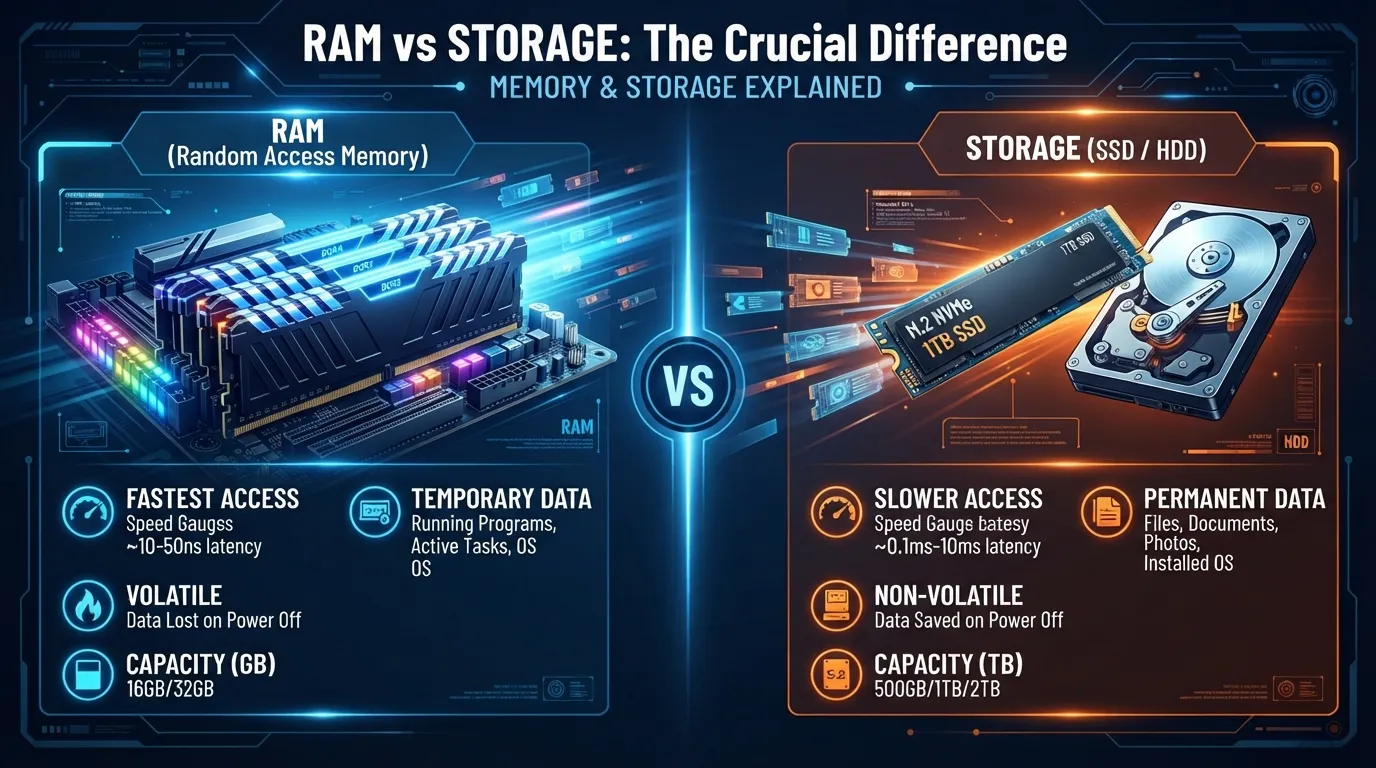
The main difference between RAM and storage lies in how long each one holds data. RAM, or Random Access Memory, holds data for a short time while a device is on and in use. Storage, like a hard drive or SSD, holds data for a long time, even when the device turns off. RAM helps a device think fast in the moment. Storage helps a device remember things for good.
Read more about https://comparificationn.com/difference-between-arc-and-earc/
Why This Difference Matters
Knowing RAM vs storage matters for buyers, students, and tech workers alike. Many people waste money on a device with the wrong mix of RAM and storage, since they don’t know what each part does. For students who study tech, and for experts who build or fix devices, this gap shapes real choices, like why a phone runs slow or why a laptop takes long to save a big file. For society, this small bit of knowledge helps people buy smarter and use their devices with more ease.
Pronunciation
| Word | US | UK |
| RAM | “ram” (rhymes with “jam”) | “ram” (rhymes with “jam”) |
| Storage | “STOR-ij” | “STAW-rij” |
Difference Between RAM and Storage
- Main Job RAM holds data that a device needs right now. Storage holds data that a device may need later. Example 1: RAM holds the tabs you have open in your browser right now. Example 2: Storage holds the photos you took last year, saved for good.
- How Long Data Stays RAM loses its data once the device turns off. Storage keeps its data even after the device turns off. Example 1: If your laptop shuts down while you type, unsaved words in RAM can be lost. Example 2: A saved photo in storage stays there even after you turn off your phone.
- Speed RAM works very fast, since it feeds data to the device in the moment. Storage works slower, since it holds large amounts of data long-term. Example 1: RAM lets you switch between apps with almost no wait. Example 2: Storage may take a few seconds to open a large video file.
- Size RAM tends to come in smaller sizes, like 8GB or 16GB. Storage tends to come in much larger sizes, like 256GB or 1TB. Example 1: A laptop may have 16GB of RAM to run apps smoothly. Example 2: The same laptop may have 512GB of storage to hold files, movies, and games.
- What It Feels Like When Full When RAM runs low, a device can slow down or freeze. When storage runs low, a device may stop you from saving new files. Example 1: Too many open apps can make RAM fill up and cause lag. Example 2: A phone with full storage may block you from taking a new photo.
- Cost per GB RAM tends to cost more per GB than storage. Storage tends to cost less per GB, especially in hard drives. Example 1: Adding more RAM to a laptop can raise its price a fair bit. Example 2: Adding more storage space often costs less than adding the same size in RAM.
- Type of Data Held RAM holds data tied to tasks that are active right now. Storage holds data tied to files you plan to keep. Example 1: RAM holds the game data while you play, in real time. Example 2: Storage holds the game file itself, so you can open it again later.
- Effect When Removed If RAM is removed, a device can’t run at all. If storage is removed, a device may still turn on but have no files. Example 1: A computer with no RAM chip won’t boot up at all. Example 2: A computer with a blank storage drive can still turn on, but shows no files.
- Common Types RAM comes as small chips, like DDR4 or DDR5. Storage comes as drives, like an HDD or an SSD. Example 1: A gaming PC may use fast DDR5 RAM chips. Example 2: The same PC may use an SSD drive to store games and files.
- How Users Notice It Users notice low RAM through slow apps and freezing. Users notice low storage through “storage full” warnings. Example 1: A phone with low RAM may lag when you open many apps at once. Example 2: A phone with low storage may show a pop-up that says “storage almost full.”
How They Act
RAM
RAM acts like a busy desk. It holds the papers, or data, you’re using right now, so you can work fast. Once you clear the desk, or turn off the device, those papers are gone.
Storage
Storage acts like a filing cabinet. It holds files for the long run, even when you’re not using them. You can open the cabinet any time and the files will still be there.
Why People Mix Them Up
People mix up RAM and storage because both get measured in the same units, like GB, and both sit inside the same device. Store ads often list both terms side by side, like “8GB RAM, 128GB storage,” which can blur the line for buyers who don’t know tech terms well. Since both parts help a device “remember” things in some way, it’s easy to think they do the same job.
Comparison Table
| Feature | RAM | Storage |
| Full name | Random Access Memory | Storage (HDD/SSD) |
| Main job | Holds active data | Holds saved data |
| Data lasts | Only while device is on | Even after device turns off |
| Speed | Very fast | Slower than RAM |
| Typical size | 4GB to 32GB | 128GB to several TB |
| Cost per GB | Higher | Lower |
| Common types | DDR4, DDR5 | HDD, SSD |
| Removed effect | Device won’t run | Device runs, but no files |
| Measured in | GB | GB or TB |
| Found in | Phones, PCs, laptops | Phones, PCs, laptops |
Which Fits Which Case?
When more RAM fits: If a user runs many apps at once, edits video, or plays large games, more RAM helps the device stay fast and smooth. Gamers, editors, and multitaskers gain the most from a device with a strong amount of RAM.
When more storage fits: If a user keeps lots of photos, videos, or large files, more storage matters most. People who film often, save large files, or install many apps and games will run out of space fast without enough storage.
Metaphors and Similes
- “Her mind works like RAM under pressure” — means she can juggle many thoughts fast.
- “His memory is like a storage drive, full of old facts” — means he holds onto facts for a long time.
- “The team’s plans got wiped like RAM after a shutdown” — means the plans were lost fast, with no trace.
- These terms come from tech, so they mostly show up in tech talk, though “storage” fits more easily into daily speech than RAM.
Connotative Meanings
RAM:
- Positive: “This phone has great RAM, it never lags” — means it works fast and well.
- Neutral: “The laptop comes with 16GB of RAM” — just states a fact.
- Negative (rare): “Low RAM makes this phone painfully slow” — means it causes stress or trouble.
Storage:
- Positive: “I love how much storage this phone has” — means it holds a lot with ease.
- Neutral: “Storage space fills up over time” — just states a fact.
- Negative (rare): “I’m always stuck with low storage” — means it causes stress or trouble.
Idioms and Proverbs
RAM is too new and too technical to have real idioms. Storage, though, connects to daily life more, and shares ground with some common sayings:
- “Save it for a rainy day” — “He backs up his files to storage, saving them for a rainy day.”
- “Out of sight, out of mind” — “Old files sit in storage, out of sight and out of mind, until he needs them.”
Books and Movies
RAM and storage are tech parts, not story topics, so they rarely show up by name in books or films. A few works do touch on the wider world of computers and memory:
- Neuromancer — science fiction novel, William Gibson, 1984 (touches on memory and data in a digital world)
- The Soul of a New Machine — nonfiction book, Tracy Kidder, 1981 (tells the real story of building a new computer)
No known films are built around RAM or storage directly, since these are inner computer parts, not common story themes. Some films, like Tron (1982, USA) and The Matrix (1999, USA), touch on the wider idea of digital memory and data worlds.
Five Common Questions
1. Does more RAM make my device faster? Yes, to a point. More RAM helps a device run many apps at once without slowing down, though it won’t fix every speed issue.
2. Can I add more storage later? This depends on the device. Some laptops and PCs let you add storage later, while most phones do not allow this at all.
3. Is 8GB of RAM enough? For light use, like browsing and email, 8GB often works fine. For gaming or video work, 16GB or more tends to work better.
4. Why does my phone slow down when storage is full? A full storage drive can block a device from saving new files or running background tasks well, which can cause a slowdown.
5. Is an SSD the same as storage? An SSD is one type of storage. It’s a fast kind of storage drive, unlike an older, slower type called an HDD.
How Both Help Us
RAM and storage help our daily devices work with speed and ease. RAM lets us switch tasks fast, without waiting or freezing. Storage lets us keep our photos, work files, and memories safe for the long run. Together, they help phones, laptops, and other devices serve us well each day, whether we’re at work, in school, or just staying in touch with friends.
Final Words
RAM stands for speed and quick thought in the moment. Storage stands for memory that lasts, holding onto our files for the long haul. Both parts serve a device in their own way, and knowing the gap between them can help anyone buy, use, or fix a device with more care.
Conclusion
The difference between RAM and storage comes down to time and task. RAM holds data for the short term, helping a device run fast in the moment. Storage holds data for the long term, keeping files safe even when the device turns off. Both parts matter, but they serve very different roles inside every phone, laptop, and PC. Knowing RAM vs storage helps buyers make smarter choices and helps users understand why their devices act the way they do. Whether you’re buying a new laptop, fixing an old PC, or just curious about your phone, understanding RAM and storage gives you a clear view of what truly powers your daily devices.

I’m Zahid Abbas, an educator, researcher, and digital publishing strategist with a passion for linguistics, grammar, and clear communication. As a content creator and SEO specialist, I craft research-driven, reader-focused content that empowers learners and makes knowledge accessible worldwide.