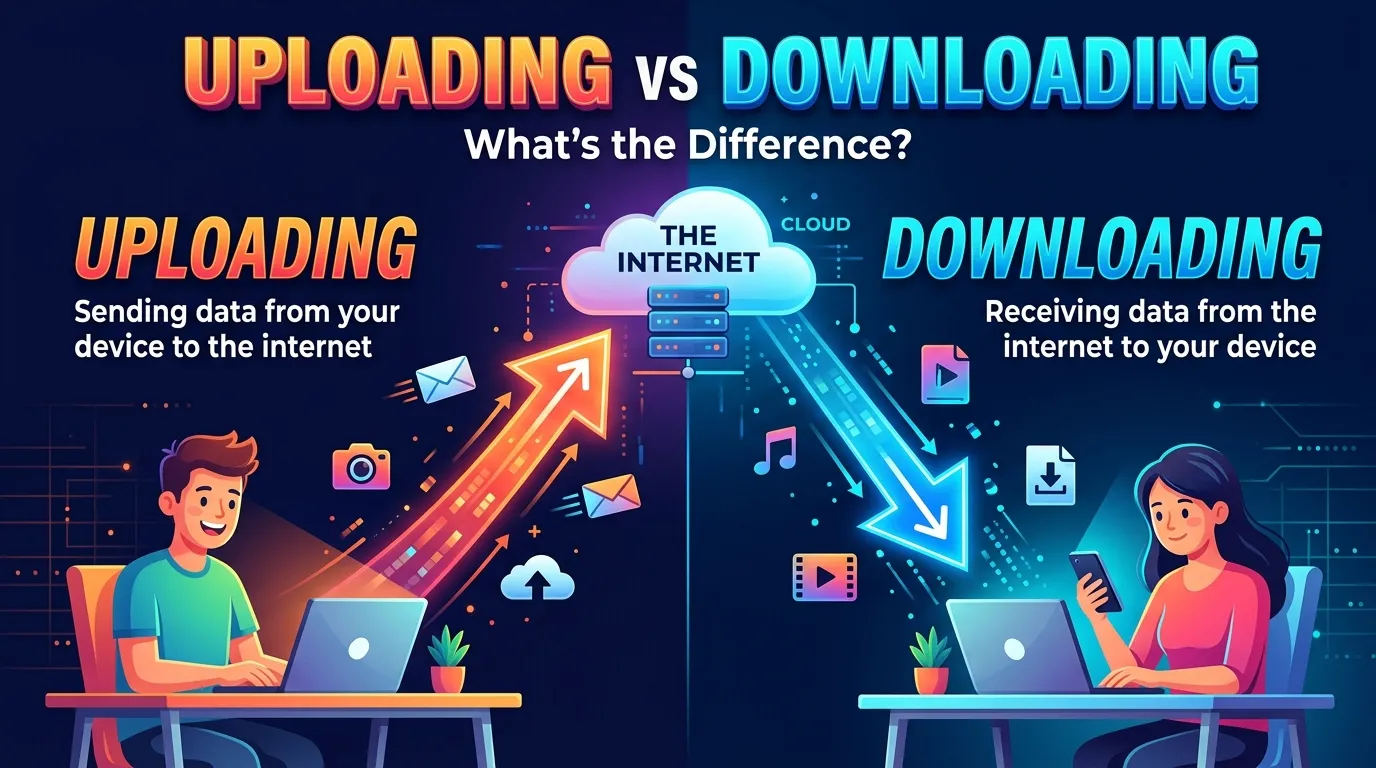
Imagine you take a photo on your phone. You want to share it with your friend, so you send it to the internet. This is called uploading. Now, your friend saves that photo from the internet to their phone. This is called downloading.
The difference between uploading and downloading is easy to learn. Uploading means sending a file from your device to another device or an online service. Downloading means getting a file from another device or an online service to your own device. We use both actions every day. We upload photos, videos, and schoolwork.And we download songs, books, and apps. Knowing the difference between uploading and downloading helps us use the internet in the right way. It also helps us save time, protect our files, and solve common internet problems.
Key Difference Between the Two
The main difference is the direction in which data moves.
- Uploading: You send data from your device to an online service or another device.
- Downloading: You receive data from an online service or another device onto your device.
For example, sending a video to a cloud drive is uploading. Saving a video from that drive to your laptop is downloading.
Why Is Their Difference Important for Learners, Experts, and Society?
These two actions are part of daily life. Students upload homework to school websites and download study notes. Workers upload reports and download work files. Doctors may upload records to secure systems and download test results when allowed.
Knowing the difference also helps people fix problems. If a photo will not send, the issue may be with uploading. If a file will not save, the issue may be with downloading.
This knowledge can also help keep data safe. People should only upload private files to trusted services. They should download files from safe sources to avoid harmful software.
Pronunciation of Uploading and Downloading
| Word | US pronunciation | UK pronunciation |
| Uploading | /ˈʌpˌloʊ.dɪŋ/ | /ˈʌpˌləʊ.dɪŋ/ |
| Downloading | /ˈdaʊnˌloʊ.dɪŋ/ | /ˈdaʊnˌləʊ.dɪŋ/ |
Difference Between Uploading and Downloading
1. Direction of Data
Uploading
Uploading sends data away from your device to an online service or another device.
Examples:
- Mia uploads a photo to her cloud drive.
- Sam uploads his homework to the school website.
Downloading
Downloading brings data from an online service or another device to your device.
Examples:
- Mia downloads a photo from her cloud drive.
- Sam downloads a worksheet from the school website.
2. Main Purpose
Uploading
The main goal is to share, store, or send a file.
Examples:
- A student uploads an essay for a teacher to read.
- A family uploads photos to save them online.
Downloading
The main goal is to get a file for use on your own device.
Examples:
- A student downloads an essay sample to study.
- A family downloads photos to view them offline.
3. Where the File Starts
Uploading
The file usually starts on your phone, tablet, or computer.
Examples:
- You upload a song saved on your laptop.
- You upload a video recorded on your phone.
Downloading
The file usually starts on a website, server, or another device.
Examples:
- You download a song from a music store.
- You download a video from a site that allows it.
4. Where the File Goes
Uploading
The file goes to an online service or another device.
Examples:
- A photo goes from your phone to a cloud drive.
- A report goes from your laptop to a work server.
Downloading
The file comes to your device.
Examples:
- A photo comes from a cloud drive to your phone.
- A report comes from a work server to your laptop.
5. Common Uses
Uploading
People upload files to share them or keep them online.
Examples:
- A teacher uploads lesson notes for students.
- A singer uploads a new song to a music platform.
Downloading
People download files to read, watch, install, or use them.
Examples:
- A student downloads lesson notes before class.
- A user downloads an app to a phone.
6. Internet Speed
Uploading
Upload speed affects how fast you can send files. Large videos may take more time to upload.
Examples:
- A slow upload speed makes a large video take longer to send.
- A fast upload speed helps a worker send a large work file sooner.
Downloading
Download speed affects how fast you can receive files. Large files may take more time to download.
Examples:
- A slow download speed makes a game take longer to save.
- A fast download speed helps a student get a large book file sooner.
7. Data Use
Uploading
Uploading uses data to send files from your device.
Examples:
- Uploading many photos may use a lot of mobile data.
- Sending a long video to the cloud may use a large amount of data.
Downloading
Downloading uses data to bring files to your device.
Examples:
- Downloading a film may use a lot of mobile data.
- Saving a large app may use more data than saving a small photo.
8. File Access
Uploading
Uploading can make a file available online. Who can see it depends on the service and its sharing settings.
Examples:
- A student uploads a project so the teacher can view it.
- A worker uploads a report to a team folder.
Downloading
Downloading can give you a local copy of a file. You may then be able to open it without the internet.
Examples:
- A student downloads a worksheet to read it offline.
- A worker downloads a report to use during a trip.
9. Common Problems
Uploading
An upload may fail because the internet is weak, the file is too large, or the service has a problem.
Examples:
- A video stops uploading when the Wi-Fi connection drops.
- A website rejects a file that is too large.
Downloading
A download may fail because the connection is weak, the link is broken, or the device lacks space.
Examples:
- A song does not download because the internet stops working.
- A large game cannot download because the phone has little free space.
10. Safety and Privacy
Uploading
Before uploading, check what the file contains and who can see it.
Examples:
- A person should not upload a private ID card to a public page.
- A worker should upload company files only to approved services.
Downloading
Before downloading, check that the file comes from a safe source.
Examples:
- A user should download an app from a trusted app store.
- A student should avoid unknown files that may contain harmful software.
Nature and Behaviour of Uploading
Uploading is an action that sends data from your device to another place. It often happens when you share a file, post a photo, send an email attachment, or save a file to cloud storage.
Uploading can happen in the background. For example, a phone may upload photos to a cloud service when the feature is turned on. The speed depends on the file size, internet connection, and service.
Uploading does not always mean that everyone can see the file. A file may be private, shared with a few people, or public. The settings decide who can access it.
Nature and Behaviour of Downloading
Downloading is an action that brings data to your device from another place. It happens when you save a document, install an app, or get a photo from a website.
Some downloads save a copy of a file on your device. Others install software or add content to an app. The file may be stored in a folder, such as Downloads, or in another place chosen by the app.
Downloading also depends on the internet connection, file size, and free storage space. Some files can be used offline after they are downloaded. Others still need an internet connection to work.
Why Are People Confused About Their Use?
People often mix up uploading and downloading because both involve moving files over the internet. They may also happen on the same website or app.
For example, when you use a cloud drive, you can upload a file from your laptop and later download it to your phone. The service is the same, but the direction of data is different.
Some apps also use words like sync, send, save, and import. These words can make the process less clear. A simple way to remember the difference is:
- Upload = send out.
- Download = bring in.
Think about where the file starts and where it goes. This will help you choose the right word.
Comparison Table: Uploading vs. Downloading
| Feature | Uploading | Downloading |
| Main action | Sends data | Receives data |
| Direction | From your device to another place | From another place to your device |
| Main goal | Share or store files online | Get files for use |
| Starting point | Usually your device | Usually a website, server, or another device |
| End point | An online service or another device | Your device |
| Common example | Sending a photo to cloud storage | Saving a photo from cloud storage |
| Speed needed | Upload speed | Download speed |
| Data use | Uses data to send files | Uses data to receive files |
| Common problem | Upload may stop or fail | Download may stop or fail |
| Safety tip | Check privacy and sharing settings | Check the source before saving files |
Similarities Between Uploading and Downloading
Uploading and downloading also share some features:
- Both move digital data.
- Both may need an internet connection.
- Both can involve photos, videos, music, and documents.
- Both can take more time when files are large.
- Both may fail because of a weak connection.
- Both need care to keep files and personal data safe.
- also read more about https://comparificationn.com/difference-between-psychic-and-medium-2/
Which Is Better in What Situation?
Neither uploading nor downloading is always better. The right choice depends on what you want to do.
Uploading is best when you want to send a file to someone, share your work, or save a copy online. For example, a student uploads homework so a teacher can read it. A family may upload photos to keep them in cloud storage.
Downloading is best when you want to get a file onto your own device. For example, a student downloads a book to read during a trip. A worker downloads a report to use while offline.
In many cases, people use both actions together. You may upload a photo from your phone and later download it to your computer.
How Are Uploading and Downloading Used in Metaphors and Similes?
Uploading and downloading are tech terms, but people may also use them in creative ways. These uses are not always literal.
Uploading as a Metaphor
Uploading can stand for sending ideas, feelings, or knowledge to others.
Examples:
- “She uploaded her ideas to the team.” This means she shared her ideas online.
- “He uploaded his thoughts into the group chat.” This means he sent his thoughts to the group.
Downloading as a Metaphor
Downloading can stand for taking in ideas, facts, or new knowledge.
Examples:
- “I downloaded a lot of tips from my teacher.” This means I learned many tips from the teacher.
- “The team downloaded the new plan.” This means the team received the plan and learned what to do.
Similes
A simile compares one thing to another using words such as like or as.
Examples:
- “Uploading the photos was like sending postcards through a wire.”
- “Downloading the lesson was like bringing a book home from a library.”
These are creative comparisons. They help explain the actions, but they are not strict technical meanings.
Connotative Meaning of Uploading and Downloading
A connotative meaning is the feeling or idea that a word may bring to mind. Uploading and downloading are mostly neutral words. Their meaning can change with the situation.
Connotative Meaning of Uploading
Positive meaning: Uploading may suggest sharing, teamwork, and keeping files safe.
Examples:
- “She uploaded her class notes to help everyone study.”
- “He uploaded family photos to keep them safe online.”
Negative meaning: Uploading may suggest a privacy risk or an unwanted share.
Examples:
- “He uploaded private photos without asking.”
- “She uploaded a file to the wrong group.”
Neutral meaning: Uploading can simply describe sending a file.
Example:
- “The worker is uploading a report.”
Connotative Meaning of Downloading
Positive meaning: Downloading may suggest learning, access, and useful tools.
Examples:
- “The student downloaded a free reading book.”
- “She downloaded an app that helps her learn English.”
Negative meaning: Downloading may suggest unsafe files or unwanted copies.
Examples:
- “He downloaded a file from an unknown site.”
- “She downloaded a harmful app by mistake.”
Neutral meaning: Downloading can simply describe receiving a file.
Example:
- “The computer is downloading an update.”
Idioms and Proverbs Related to Uploading and Downloading
There are no old, widely used idioms that directly use the words uploading and downloading. However, some common sayings fit the ideas behind these actions.
1. “Sharing is caring.”
This saying means that sharing can help others.
Example: “Nina uploaded her study notes for the whole class because sharing is caring.”
2. “Knowledge is power.”
This saying means that learning gives people useful skills and choices.
Example: “Ben downloaded free lessons to learn coding. He knew that knowledge is power.”
3. “Better safe than sorry.”
This saying means it is wise to take care before a problem happens.
Example: “Mia checked the website before downloading the file. She believed it was better safe than sorry.”
4. “A picture is worth a thousand words.”
This saying means a picture can share a lot of meaning without many words.
Example: “Leo uploaded a photo of the school event because a picture is worth a thousand words.”
These sayings are related to the uses of uploading and downloading. They do not mean the same thing as the technical terms.
Works in Literature Related to Uploading and Downloading
Uploading and downloading are modern computer terms. Older books may explore similar ideas, such as sharing knowledge, storing information, and getting information from a source. The works below relate to these ideas, but their titles do not contain the exact words uploading or downloading.
- The Information: A History, a Theory, a Flood — Genre: Nonfiction; Writer: James Gleick; Year: 2011. This book explores how people create, share, and store information.
- The Shallows: What the Internet Is Doing to Our Brains — Genre: Nonfiction; Writer: Nicholas Carr; Year: 2010. This book looks at how the internet may change the way people read and think.
- Little Brother — Genre: Young adult science fiction; Writer: Cory Doctorow; Year: 2008. This novel explores computers, digital freedom, and privacy.
- Neuromancer — Genre: Science fiction; Writer: William Gibson; Year: 1984. This novel explores computers and digital worlds.
- The Circle — Genre: Fiction; Writer: Dave Eggers; Year: 2013. This novel looks at online sharing, privacy, and the power of technology.
These works can help readers think about how people use information in a digital world.
Movies Related to Uploading and Downloading
These films explore digital life, computers, or online information. They are not all directly about uploading and downloading.
- The Social Network — Release year: 2010; Country: United States. This film tells a fictionalized story of the start of Facebook and the growth of online sharing.
- The Matrix — Release year: 1999; Country: United States. This science fiction film explores a computer-made world and the link between people and machines.
- WarGames — Release year: 1983; Country: United States. This film follows a young computer user who connects to a military system.
- Her — Release year: 2013; Country: United States. This film explores a man’s bond with an advanced computer system.
- The Great Hack — Release year: 2019; Country: United States. This documentary looks at personal data, online services, and privacy.
These films show how digital systems can shape daily life. They also raise questions about data, safety, and online sharing.
Five Possible asked Questions About Uploading and Downloading
1. What is the main difference between uploading and downloading?
Uploading sends a file from your device to an online service or another device. Downloading brings a file from an online service or another device to your device.
2. Is sending an email an upload or a download?
Sending an email with an attachment sends data away from your device. This includes uploading the attachment to the email service. Receiving and saving an attachment is downloading.
3. Does downloading always need the internet?
Most downloads need an internet connection. But some files can be copied from another device without the internet. For example, you may copy a file from a USB drive to your computer.
4. Why is uploading sometimes slower than downloading?
Many internet plans offer different upload and download speeds. Upload speed may be lower than download speed. The file size, Wi-Fi signal, and service can also affect the time.
5. Is uploading or downloading safer?
Neither action is always safer. Uploading private data to the wrong place can expose it. Downloading unsafe files can harm your device. Use trusted services, check privacy settings, and avoid unknown files.
How Are Uploading and Downloading Useful for Our Surroundings?
Uploading and downloading help people share information and learn from each other. Students can upload their work and download class notes. Families can upload photos to share with relatives. Workers can send reports and get files from their teams.
These actions can also help communities. A local group may upload news about an event. People may download maps, public guides, or forms from trusted websites. This can make information easier to find.
Still, people must use these tools with care. They should protect private details, respect other people’s work, and check whether they have permission to share or save a file. Safe use helps everyone benefit from digital tools.
Final Words on Uploading and Downloading
Uploading and downloading are two basic actions that help the internet work for us. Uploading sends files out from your device. Downloading brings files in to your device.
Both actions help us share, learn, work, and stay in touch. The best way to remember them is simple: upload means send, and download means receive. Once you know this, it becomes easier to use websites, apps, and cloud storage.
Conclusion
The difference between uploading and downloading comes down to the direction of data. Uploading sends a file from your device to an online service or another device. Downloading brings a file to your device from another place. We use both actions for school, work, fun, and daily tasks.
Uploading is useful when you want to share files or store them online. Downloading is useful when you want to save files and use them on your device. Both actions can use internet data and may take time. They also need safe habits. Check where you upload files, and be careful about what you download. With these simple steps, you can use the internet with more care and confidence.

I’m Zahid Abbas, an educator, researcher, and digital publishing strategist with a passion for linguistics, grammar, and clear communication. As a content creator and SEO specialist, I craft research-driven, reader-focused content that empowers learners and makes knowledge accessible worldwide.